Birth Announcement Ornaments
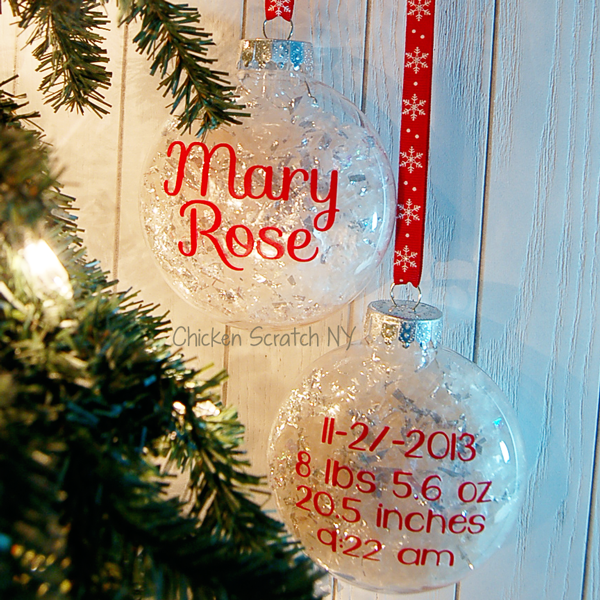
This Birth Information Ornament will make a perfect holiday gift for all the moms, dads, and grandparents in your life. The supplies for this project are cheap and easy to find but they represent priceless memories so you might as well make a bunch.
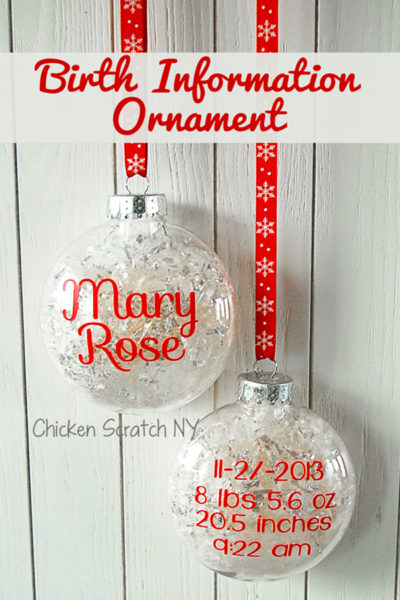
We had a baby explosion in my family last year (4 baby girls born within 10 months of each other!) and hanging these ornaments on the tree year after year will be a great reminder of how lucky we are to have a giant family.
When I was growing up my mom had metal ornaments for my sister and I with our birth weights, lengths, and times on them; I was always fascinated that they knew the exact time I came into the world! Now my kids can have the same thing on their tree.
I used plastic 'unbreakable' ornaments for these (see the previous statement about 10 million children) but you can do the same thing on a glass ornament. I would love to put glass ornaments on my tree but between the kids and the cats it would be a mess and someone would be getting stitches!
For each ornament you will need:
- Flattened plastic ball ornament (I bought mine at Micheal's)
- Vinyl
- Transfer tape
- Silhouette + Mat + Silhouette Studio
- Fake snow
- Funnel
Ornament Vinyl Instructions:
On a blank page in silhouette studio set up a 3-inch circle. Select the circle tool, click and hold down the shift key while dragging to make a perfect circle.
This circle isn't going to be cut out, it's just a guide so you know how big to make your text. The ornaments are bigger than 3 inches but they are much flatter in the center and you'll have an easier time getting your vinyl to lay flat.
Duplicate the circle using your favorite method. You'll need two for each ornament, one for the front and one for the back.
For more tips about Duplicating shapes in Silhouette Studio check out my Paper Pumpkin Banner Tutorial
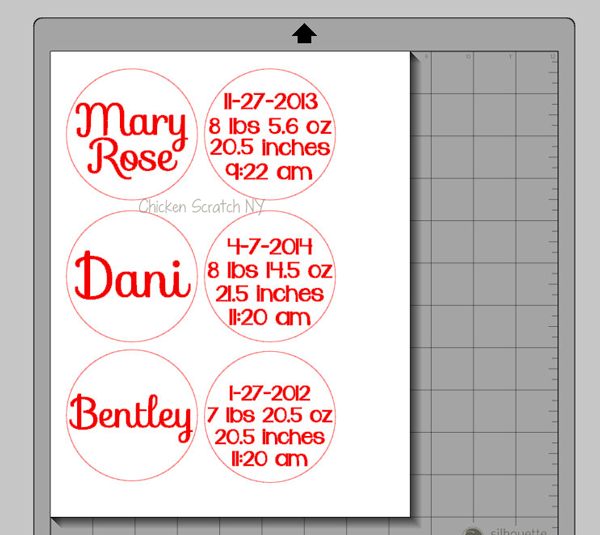
On one side set up the name. If you're using a script font like I did you'll need to weld the letters together so they cut in one piece. I used the font Sofia for the name.
The back of the ornaments is slightly more involved, I used the font KG Dark Side because it's easy to read but not boring.
You won't need to weld this text unless you're using another script font. I found that the information fits best in the following order
- Date
- Weight
- Length
- Time
Select all 4 rows, right click and select [Group]. This will keep your rows together and make it impossible to accidentally move something (or delete it...)
Once you've got your sizing down you can delete the circles and move everything closer together to reduce the amount of wasted space.
I like to add a smaller box around each name/set of stats. In my opinion it is it easier to weed in a small area vs a full sheet of vinyl, especially with tiny pieces.
Load the vinyl into your machine (with or without a mat, whichever you prefer) and cut out out using the settings that work for your vinyl. If you're using a new kind of vinyl (variety or brand) I recommend doing a small test cut before you send over the more involved cut files.
When the cutting is done weed the vinyl, pulling off the backing and leaving behind the letters. Don't forget to remove the insides of the letters!
Birth Information Ornament Instructions:
1. Eyeball the center of the ornament, it's important to get it centered because the ornament is flatter in the middle and the vinyl won't bubble as much
2. Transfer the vinyl design to the ornament using transfer tape
3. Smooth down by rubbing with your fingers in small circles all over the design
4. Remove the top of the ornament and fill with fake snow. I used two types, one was iridescent and one was basically shredded plastic. FYI if you're in a pinch don't have any fake snow then feel free to chop up some clear plastic bags
5. Replace the top and shake, the snow will settle and you'll need to add more (you might need to do this a few times)
Check out my Christmas Page for more ideas or start here:
Looking for more Silhouette Projects?
My Silhouette Challenge buddies and I are all sharing projects on our blogs today, so peruse the projects below for a wealth of Silhouette inspiration!
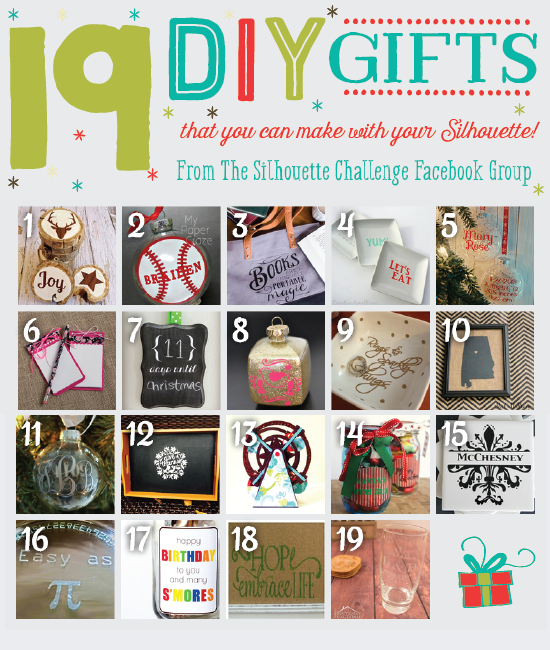
1. Get Silvered // 2. My Paper Craze // 3. unOriginal Mom // 4. Creative Ramblings // 5. Chicken Scratch NY // 6. Pitter and Glink // 7. Ginger Snap Crafts // 8. Architecture of a Mom // 9. Silhouette School // 10. McCall Manor // 11. Just a Girl and Her Blog // 12. Weekend Craft // 13. Rutchee Design // 14. Adventures in All Things Food // 15. My Favorite Finds // 16. Please Excuse My Craftermath // 17. Simply Kelly Designs // 18. Dragonfly & Lily Pads // 19. Practically Functional //
That is so cute. I might make one for my new (ish) niece for her first xmas this year.
These ornaments are adorable and would make great gifts for grandparents too.
OMGosh I love this ornament so much. Thank you for sharing. I can't wait to make some of my own.
Love this idea!
{totally reminds me of the "Horton Tree" from "Days of our lives"}
What a great gift idea!
Love this idea! It celebrates babies without being too cutesy!
I so love these cute little ornaments! I am going to give it a try.
That turned out great! Looks professionally done! Love the fonts!
What a sentimental Christmas ornament! I'd love these for my kids too!
I wish I had one of these machines, people can create the coolest things.
Great idea and what a lovely ornament. What a thoughtful gift.
What a great and simple DIY for the holidays. Plus, personally I love a tree that is filled with all sorts of DIY ornaments instead of the static store-bought perfect ones. - Katy
These ornaments are amazing! I'm going to half to copy your idea and make some for my own tree.
I am so in love with this idea. What my sister in law has her baby I am going to do this for her. Love it!!
I just love this idea. It is so unique.
This is such a great ornament to give as a gift to grand parents and Aunts and Uncles. It looks so simple to make.
I love these! I have to confess, they are a bit intimidating to me. I feel like I need to start ornaments with a flatter surface. But you make these look so easy! And, Sofia is my FAVORITE font!
Don't be scared! These are pretty flat and the scripty font it more forgiving than something with all straight lines. If it's a little out of place you can't tell. Sophia is one of my all time faves too 🙂
Now that is a fantastic idea. Great for the new grandson we are expecting in December
This is great! I'd love to make one for my daughter and for our upcoming arrival. Thanks for sharing the instructions!
That is really a cute idea! I need to get one of those machines and start creating myself!
Those are so adorable, and I love that it is not too hard to do. I need to get one of those machines soon, I have seen people creating all kinds of fun crafts!